🩺
Built only for dialysis
Session charting, dry weight, access, machines and adequacy tracking — not a generic EMR stretched to fit renal care.

LOBMAX PCS-D digitises your entire dialysis centre — and lets nurses chart hands-free by voice. Patient records, sessions, scheduling, prescriptions, labs and billing in one web platform built only for renal care.

Dialysis is repetitive, time-critical and documentation-heavy. PCS-D is designed around that routine.
Session charting, dry weight, access, machines and adequacy tracking — not a generic EMR stretched to fit renal care.
Nurses speak vitals, medicines and events while their hands stay with the patient. Typing is for the exceptions.
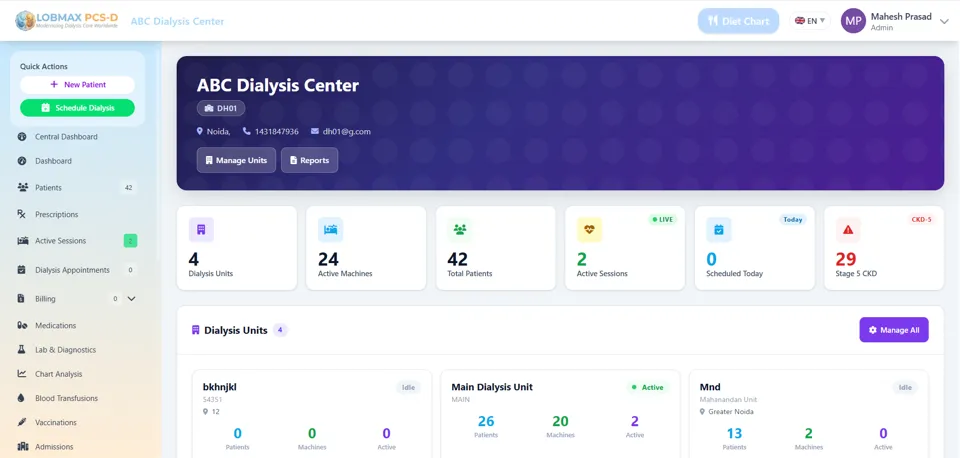
Owners and administrators see units, machines, patients and live sessions across locations from a single dashboard.
Complete patient history, lab trends and audit trails make reviews, reports and inspections straightforward.
Use it from any browser. No local server, no manual updates, and your data is backed up for you.
Built by Eitonics Technologies in Greater Noida with onboarding and support for Indian dialysis centres.
Modules you can see in the live product — from the patient list to billing.
Speak vitals, parameters, medicines and events; confirm with "OK" to save.
Demographics, history, CKD stage and a full patient timeline in one record.
Live hemodialysis session charting with vitals and treatment notes.
Appointments by unit, machine and shift to keep chairs fully used.
Dialysis prescriptions, medicine lists and administration tracking.
Order, store and trend lab results alongside the patient record.
Clinical charts and reports to review outcomes and treatment quality.
Bills for sessions and services, covering self-pay, private insurance and government schemes.
Track blood transfusions, vaccinations and admissions for each patient.
Renal diet charts for patients, ready to share.
Manage dialysis units, machine status and utilisation across sites.
Permissions for doctors, nurses, front desk and admins, with activity logs.
CAPD and APD workflows alongside hemodialysis in the same system.
Nurses are busy with patients, lines and machines. With PCS-D voice charting they speak the entry instead of stopping to type — and nothing is saved until they confirm it.
Works in Chrome or Edge. A headset with a microphone is recommended for busy units; accuracy depends on the microphone.
See Voice Charting Live“Patient Mahesh Singh. BP 130 by 80, heart rate 72, blood sugar 110.”
It repeats the entry and asks: “OK or cancel?”
“OK.” — saved to the patient’s chart and logged.
Whether you run one unit inside a hospital or several dialysis centres across cities, PCS-D scales without new infrastructure.
We walk through PCS-D using your centre's real workflow.
We configure your units, machines, users and bring in existing patient data.
Hands-on training for doctors, nurses and front-desk teams.
Start with our team alongside you, then ongoing support.
It digitises a dialysis unit: patient records, treatment sessions, schedules, prescriptions, lab results, billing and reports. LOBMAX PCS-D is built specifically for hemodialysis and peritoneal dialysis rather than adapted from a generic hospital system.
Yes. It covers hemodialysis sessions as well as peritoneal dialysis workflows including CAPD and APD.
Yes. A central dashboard shows all your units, machines, patients and live sessions, while each unit keeps its own day-to-day workflow.
The nurse speaks the entry, for example a patient name with BP, heart rate and blood sugar. The system reads it back and nothing is saved until the nurse says OK. Saying cancel discards it, and every voice entry is recorded in the audit trail.
Vitals, treatment parameters, medicines and standard injections, adverse events, post-dialysis weight and BP, starting and ending a session, and printing the session summary.
No. PCS-D is cloud based and runs in a web browser on a PC, tablet or phone. Updates are applied centrally.
Most centres can start within a few weeks, including data migration and staff training. Small single-unit centres can often start much sooner. We confirm the timeline during the demo.
Pricing depends on the number of units, machines and users. Book a demo and we will share a quote for your centre.
Data is encrypted in transit, access is role-based, and user actions are logged. ISO 27001 certification is in process.
Tell us about your centre and our team will call you to schedule a personalised demo and share a quote.